Joshua Brauer

With Google Apps the dots do matter

June 27, 2012

For years the lowly dot in gmail addresses didn't matter. You could be joshua@ and jo.sh.ua@ all the same and your email would reach you. This had some uses when filtering mail in various systems. Though I've not found an announcement of the change and Google is littered with links that say otherwise it appears from testing this morning with several domains that dots or periods, whatever you may call them, do matter but only if you're using Google Apps.

Read more about With Google Apps the dots do matter

Setting up Xdebug with Acquia Dev Desktop for local debugging

June 17, 2012

A while back Robert Douglass had written a great guide to setting up Acquia Dev Desktop to use Xdebug on Mac OS X. Looking for it today it looks like the sands of time have erased it from the webs. At the same time the recent versions of Dev Desktop include Xdebug so the process is a little different (and simpler).

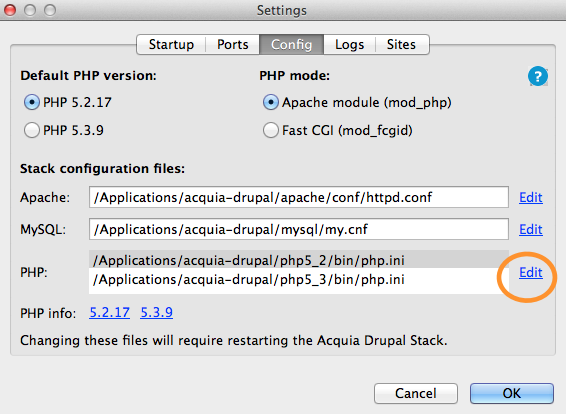
Settings panel with Edit highlighted

In this case I'm setting up Xdebug to work with Komodo IDE and Dev Desktop that comes bundled with Drupal 7. After installing Dev Desktop and setting up your first site it's time to enable Xdebug. In the recent versions of Dev Desktop it ships with Xdebug but the PHP extension is turned off.

The first step is launching the Dev Desktop control panel. Once it has started click the "Settings..." button in the lower right. Then pick the "Config" tab at the top center to see the server configuration. The screen shot here shows PHP 5.2 but the process is the same for 5.2 or 5.3. Whichever version of PHP click the Edit link beside the php configuration files.

This will open the chosen php.ini file in Text Edit. With the file open look for the line containing xdebug.so. If the installation is in the standard directory it will look something like this:

Read more about Setting up Xdebug with Acquia Dev Desktop for local debugging

Using iPad to hold your photos while on vacation

February 20, 2012

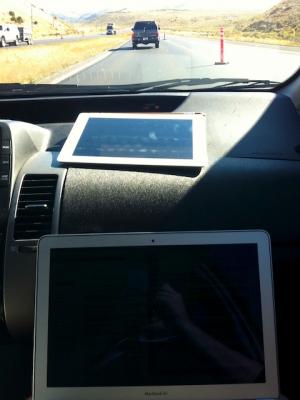
Working on computer on the roadA family member recently sent a question to my wife about how to keep photos safe while traveling.

And speaking of road trips, we are heading to Hawaii and are planning on getting an iPad for entertainment along the way. We are wondering if you have used your iPad as a photo transfer station from your EyeFi card to your iPhoto at home. Does it work that way? We don't have a laptop, so we were thinking an EyeFi card would allow us to take pictures and upload them to our iPad (and ultimately our computer) for safe keeping. Or, would we be better off taking the card to the local Costco to get a cd made to make sure we have the pics safe and sound? Thank you for any insight you might be able to offer.

This is a workflow I've spent quite a bit of time on over the years. My thinking is definitely affected by two instances of losing photos I'd really like to have back.

The first instance where I lost photos was years ago on a business trip to Wichita of all places. I'd taken some photos on the plane as well as some pretty nice sunset photos. I'd reviewed them on the camera's (tiny by modern standards) screen and shared them with colleagues on the trip. When I downloaded the photos I didn't notice that the card was evidently corrupted in some way and only a portion of the photos were saved to the computer. Thinking that all was well the card was formatted and I went on shooting. Had I caught it in time I could have likely used some card recovery software and gotten back at least some of the photos.

Read more about Using iPad to hold your photos while on vacation

Make Facebook more useful by blocking apps

February 19, 2012

The last thing I wanted to do is publish one of those annoying posts where someone tells you how to make Facebook better. So here it is. This is a recipe that I find works for me and recently sharing with a couple of friends has worked for them. It's not a secret recipe for untold wealth or making life better. It is a way to make something like Facebook enjoyable for how I want to use it.

Simply put the main method here is block apps. Not just the invites to join apps but the whole app themselves. I've blocked hundreds of apps in the years I've been using Facebook and it makes the experience much more enjoyable from my point of view. There are, of course, a few exception to the block 100% of apps rule, but just a few.

Sometime back I noticed that while I could make my news stream cleaner by ignoring the latest "spammy post a day app" that someone had added, perhaps unknowingly. When I would visit their page I'd be treated to a sea of spammy posts and only a few meaningful ones. By blocking the apps entirely I get the real things they have to say when they say them and not the rest.
Read more about Make Facebook more useful by blocking apps

Create custom Adjix short URLs with Alfred

December 1, 2011

Alfred.app Logo Although I use it all the time it turns I haven't written here about Adjix. There is one mention in some issues but nothing that spells out just how awesome it is. The short version is Adjix is hands down the single best URL shortener out there. While it deserves it's own post suffice it to say you can use its power and still retain a copy of your links on your own S3 drive. Future proofing at its best.

But this post isn't about that. It's about using your own custom domain and setting up a URL shortener that works from Alfred. Alfred is itself another awesome tool that deserves yet another post. Inspired by a post on Dirt Don I set out to create a url shortening shortcut. (Recursion is encouraged).

So based on this post I setup a quick shell script shortcut in Alfred. The properties end up looking something like this:

Read more about Create custom Adjix short URLs with Alfred

Drush away unserialize() errors

November 26, 2011

When you work with the great folks I do every day it comes as little surprise that when the stuff hits the fan and some site is in need of help there will be a legion of folks who jump into round-the-clock action to get things in a better place. While this could be a whole blog post about that alone it's not about that. Rather it's about one of those nagging little problems we came across while working on a site this Thanksgiving "holiday".

The problem is one that many have seen at one point or another:

[26-Nov-2011 22:35:17] PHP Notice:  unserialize() [<a href='function.unserialize'>function.unserialize</a>]: Error at offset 200 of 1100 bytes in /var/www/mysite/includes/bootstrap.inc on line 1104

In fact this problem pops up enough that it has its own page in the Drupal Handbook. The problem is pretty straightforward to understand. Some object was serialized for storage in the database and has become corrupted.

Read more about Drush away unserialize() errors

Quick address book tips

November 16, 2011


In the recent conversion to iCloud I ended up with a few hundred spare contacts on the trusty iPhone. Those who have tried the old fashion method of correcting this problem know how much fun it is to go into each of several contacts and delete them. WIth hundreds the fun grows into outright pain.

If you have an Exchange account setup on your phone that you're not using there is a quick fix. Go into Settings > Mail, Contacts and Calendar > and then to your exchange account. Set the Exchange account to sync contacts and you'll be prompted to delete local contacts. Once it does the work for you then turn contact sync back off and you're good to go.

What isn't clear is that this won't delete your contacts syncing with other accounts. It only deletes those contacts that are local to just your phone. This also only seems to work with Exchange accounts.

Another long time frustration with Mobile Me and now iCloud and address book sync has been what to do with those old addresses.

Read more about Quick address book tips

Pages

  • « first
  • ‹ previous
  • 1
  • 2
  • 3
  • 4
  • 5
  • 6
  • 7
  • 8
  • 9
  • …
  • next ›
  • last »
Subscribe to

Search this site.

© 1995-2016 Joshua Brauer.

GitHub RSS feed 500px LinkedIn